Todays technology is tomorrows technical debt – building your tech radar

or Technical Debt and the Tech Radar: Staying Ahead of Obsolescence

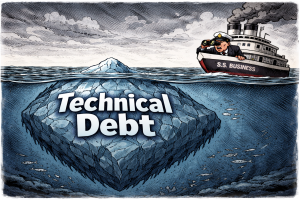
Ward Cunningham originally coined the term “technical debt” in 1992 to describe the nature of software development—specifically, the need to constantly refactor and improve inefficiencies in your code. Constant improvement. However, the technology itself becomes technical debt over time.

Consider the shift from handmade items to automation. Once automation arrived, the manual process became technical debt. As things become more efficient, older technology that once did its job adequately falls behind to newer machines and methods.

The Mainframe Example

Take servers and mainframes. In the 1940s and ’50s, computers like ENIAC filled entire rooms. ENIAC weighed over 30 tons, occupied 1,800 square feet, and consumed 150 kilowatts of power. It required elaborate cooling systems and teams of engineers to maintain. The project cost approximately $487,000—equivalent to about $7 million today.

Now consider the iPhone I’m writing this article on. According to ZME Science, an iPhone has over 100,000 times the processing power of the Apollo Guidance Computer that landed humans on the moon. Adobe’s research shows that a modern iPhone can perform about 5,000 times more calculations than the CRAY-2 supercomputer from 1985—a machine that weighed 5,500 pounds and cost millions of dollars. My iPhone uses a fraction of the power, fits in my pocket, doesn’t need a maintenance team, and cost me around $500.

Those room-sized mainframes became technical debt. Not because they stopped working, but because something dramatically better came along. So how do you prepare for the technical trends that signal what’s next to become obsolete?

What Is Technology, Really?

Before we can talk about technical debt in depth, we need to define what technology actually is.

Many people think technology means devices, microchips, or other tangible things. But in reality, technology is simply a process or an idea—a better way of doing something.

Here’s a simple example: if it takes you 15 minutes to drive to work every day, but you find a shortcut that cuts 5 to 10 minutes off your commute, that shortcut is a technology. You’ve found a more efficient process. Hardware and software are just the codification of these processes, whether it’s a chip that handles digital signal processing or a more efficient route for walking your dog.

The Triangle of Value

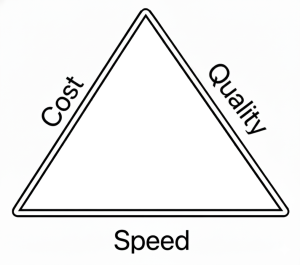
The nature of technology connects to what project managers call the Project Management Triangle (also known as the Iron Triangle or Triple Constraint). This concept, attributed to Dr. Martin Barnes in the 1960s, states: you can have three things, but you can only optimize for two at a time.

Those three things are:

  • Cost — How many resources does it take?
  • Quality — How good is the output?
  • Speed — How fast can you produce it?

Every new technology addresses one or more of these factors. Does it produce better quality? Does it make widgets faster? Does it cost less or require fewer resources?

Once you understand this perspective, technical debt becomes clearer. Technical debt is anything that negatively affects one or more parts of the Triangle of Value compared to available alternatives. Your current solution might still work, but if something else delivers better cost, quality, or speed, you’re carrying debt.

I’m Not an Inventor—So What Do I Do?

It’s true that necessity is the mother of invention. But we don’t know what we don’t know. We don’t always have the right mindset or background to invent a solution to a given problem.

However, others have encountered the same problems and asked the same questions. Some of them are inventors. They do come up with solutions, and they release those solutions into the marketplace.

The question becomes: how do I find these solutions? How do I discover the people who’ve solved the problems I’m facing?

This is where a tech radar becomes invaluable.

What Is a Tech Radar?

A tech radar is a framework for tracking upcoming technical trends that affect your industry. The concept was created by ThoughtWorks, a software consultancy that has published their Technology Radar twice a year since 2010. According to ThoughtWorks’ history, Darren Smith came up with the original radar metaphor, and the framework uses four rings—Adopt, Trial, Assess, and Hold—to categorize technologies by their readiness for use.

But the concept isn’t restricted to IT or computer science—it applies to any field. If you work in manufacturing, aluminum casting, or forging, there are emerging technologies that could make your processes more efficient. If you work in healthcare, education, logistics, or finance, the same principle applies. Some trends, like AI and the internet before it, have broad impact and touch nearly every industry because the common denominator across all fields is the manipulation of data.

The tech radar is a way to systematically track what’s emerging, what’s maturing, and what’s fading—so you can invest your time and resources accordingly.

Building Your Own Tech Radar

There’s a layered approach to building a tech radar, as described in Neal Ford’s article “Build Your Own Technology Radar.” You can enhance this process with AI tools. Here’s how to structure it:

Step 1: Identify Your Information Sources

Start by figuring out the leading sources of information for your industry:

  • Trade journals and publications — What do experts in your field read?
  • Newsletters — Many thought leaders and organizations publish regular updates
  • Websites and blogs — Company engineering blogs, industry news sites
  • Professional organizations and membershipsIEEE, ACM, industry-specific groups
  • Conferences — Both the presentations and the hallway conversations
  • Books — Especially those that synthesize emerging trends
  • Podcasts and video channels — Increasingly where practitioners share insights

Step 2: Create a Reading and Research List

Organize your sources into a structured reading list. Here’s a sample format:

Source Type Name Frequency Focus Area Priority
Newsletter Stratechery Weekly Tech business strategy High
Journal MIT Technology Review Monthly Emerging tech High
Blog Company engineering blogs Ongoing Implementation patterns Medium
Podcast Industry-specific show Weekly Practitioner insights Medium
Conference Annual industry conference Yearly Broad trends High
Book Recommended titles Quarterly Deep dives Low

Adjust the priority based on signal-to-noise ratio. Some sources consistently surface valuable trends; others are hit or miss.

Step 3: Structure Your Radar Spreadsheet

The classic tech radar uses four rings to categorize technologies:

  1. Hold — Proceed with caution; this technology has issues or is declining
  2. Assess — Worth exploring to understand how it might affect you
  3. Trial — Worth pursuing in a low-risk project to build experience
  4. Adopt — Proven and recommended for broad use

You can also categorize by quadrant, depending on your field. For software, ThoughtWorks uses:

  • Techniques
  • Platforms
  • Tools
  • Languages & Frameworks

For other industries, you might use:

  • Processes
  • Equipment/Hardware
  • Software/Digital Tools
  • Materials or Methods

Here’s a sample spreadsheet structure:

Technology Quadrant Ring Date Added Last Updated Notes Source
Large Language Models Tools Adopt 2023-01 2024-06 Mainstream for text tasks Multiple
Rust programming Languages Trial 2022-03 2024-01 Memory safety benefits Engineering blogs
Quantum computing Platforms Assess 2021-06 2024-03 Still early, watch progress MIT Tech Review
Legacy framework X Frameworks Hold 2020-01 2023-12 Security concerns, declining support Internal assessment

Step 4: Use AI to Aggregate and Summarize

If you’re monitoring many sources, you can build an aggregating agent that:

  • Pulls in articles from your reading list
  • Identifies recurring themes and emerging trends
  • Flags when multiple sources mention the same technology
  • Summarizes key points so you can triage quickly

Some trends come and go. Others stick around and reshape industries. The goal isn’t to chase every new thing—it’s to assess which trends deserve your attention and investment.

Step 5: Review and Update Regularly

Set a cadence for reviewing your radar:

  • Weekly — Scan your newsletters and feeds, note anything interesting
  • Monthly — Update your radar spreadsheet, move items between rings if needed
  • Quarterly — Step back and look at patterns; what’s accelerating, what’s stalling?
  • Annually — Major review; archive obsolete items, reassess your sources

The Cost of Ignoring the Radar

Here’s a cautionary tale. In the 1970s and ’80s, Digital Equipment Corporation (DEC) was a giant in the minicomputer market. Co-founded by Ken Olsen and Harlan Anderson in 1957, DEC grew to $14 billion in sales and employed an estimated 130,000 people at its peak.

But as MIT Sloan Management Review notes, DEC failed to adapt successfully when the personal computer eroded its minicomputer market. The company’s struggles helped inspire Harvard Business School professor Clayton Christensen to develop his now well-known ideas about disruptive innovation.

Olsen was forced to resign in 1992 after the company went into precipitous decline. Compaq bought DEC in 1998 for $9.6 billion, and Hewlett-Packard later acquired Compaq.

The technology DEC built wasn’t bad. It just became technical debt when something better arrived. They were married to their favorite technology and weren’t ready to change with the times.

Conclusion

Technical debt isn’t just about messy code or shortcuts in a software project. It’s about the broader reality that any technology—any process, any tool, any method—can become debt when something more efficient comes along.

The tech radar is your early warning system. Build one. Maintain it. Use it to make informed decisions about where to invest your learning and your resources.

And remember: don’t be married to your favorite technology or methodology. The next wave of technical debt might be the tool or process you’re relying on right now.


References

Concepts and Definitions

Historical References

People

Computing Power Comparisons

Professional Organizations (for Tech Radar Sources)

  • IEEE (Institute of Electrical and Electronics Engineers): ieee.org
  • ACM (Association for Computing Machinery): acm.org

Further Reading

  • Book: DEC Is Dead, Long Live DEC: The Lasting Legacy of Digital Equipment Corporation by Edgar H. Schein et al. Amazon
  • ThoughtWorks Technology Radar Hits and Misses: ThoughtWorks

Trust But Verify: Testing AI Agents

Trust, But Verify: Testing AI Agents

When Ronald Reagan said “trust, but verify,” he was referring to a Russian proverb “doveryai, no proveryai,” which he learned from his adviser Suzanne Massie and used during nuclear arms control negotiations with the former Soviet Union. In the same way, these powerful AI agents are useful but we need to test them. As much as we trust them, we need to verify them as much as we test and verify our code with unit and end to end testing.

AI agents are non-deterministic so you can’t do the standard ASSERT and get an expected response. Instead, we do an evaluation of the agent.

This is a core DevOps principle in CI/CD as well as other Agile coding frameworks, to test all your code with automated tests. That way you can have confidence in the behavior of your AI agent application.

To illustrate how this process would look, I’ve created a simple REPL chatbot which uses an LLM and acts as an expert on gardening and raising tomatoes.

Breaking Down the Agent for Testing

When you start developing tests for LLMs, you need to consider that as these tests are non-deterministic, the standard process for unit testing is to break down the program into smaller components. In the same way, you take your AI agent and break it down into smaller components that are testable.

However, what do you really test since it is non-deterministic? You cannot judge it by the answer as much as you have to judge it by whether it follows certain actions. For example, when it is told to use a tool such as a search engine MCP Server, does it actually execute the command for acquiring a tool or accessing a database and so on and so forth?
In the case of the AI Tomato Chat App, I have it evaluate the following:

  1. TestTomatoExpertiseQuality: Core quality metrics
    • test_answer_relevancy – Parametrized test with 3 tomato Q&A pairs
    • test_zero_toxicity_friendly_response – Validates encouragement responses
    • test_zero_toxicity_pest_response – Validates pest control responses
    • test_off_topic_rejection_quality – Ensures polite refusals
    • test_topic_adherence_planting – Custom metric for planting advice
    • test_topic_adherence_disease – Custom metric for disease advice
  2. TestFaithfulness: Factual accuracy verification
    • test_ph_level_accuracy – Validates pH range 6.0-6.8
    • test_spacing_accuracy – Validates plant spacing guidelines
    • test_watering_advice_accuracy – Validates watering recommendations
  3. TestChatbotIntegration: Integration tests with mock LLM and DeepEval
    • test_chatbot_produces_relevant_response – End-to-end container growing test
    • test_chatbot_refusal_is_polite – Off-topic refusal toxicity check
  4. TestExpertiseScenarios: Domain-specific scenarios
    • test_expertise_coverage – Parametrized test validating 4 scenarios (disease, pruning, climate, blossom end rot)
    • test_variety_knowledge – Validates knowledge of 9 common tomato varieties
  5. TestOffTopicResponse: Off-topic handling quality
    • test_off_topic_response_structure – Validates polite, helpful structure
    • test_off_topic_response_not_dismissive – Ensures no dismissive language

If you are able to consistently have the AI agent via the prompt execute tasks or commands, and you’re able to test this and test for consistency, then the AI agent and the prompt actually becomes code that’s reliable. It’s an actual piece of software that is testable versus something that is not.

So you test for a number of things: you test whether it uses tools, you test for whether there’s consistency in its answers, whether it is able to follow through, and you test for whether the answers are hallucinated.

AI as a Judge

The second component that you need besides breaking down the tasks and breaking down the AI into smaller parts that can be tested is to use an AI as a judge. Chip Huyen in her book AI Engineering describes this process of using an AI as a judge. She says to use the second most powerful AI to act as a judge. For example, if you’re using GPT-4 or GPT-5, use GPT-4 as an evaluator judge.

The AI in this case would generate various inputs and then establish what the criteria for the output should be. Based on that, you can grade how the AI agent performed. If you find that there is something that’s inconsistent, this is where you would update or change the prompts and make the adjustments. As I’ve said in earlier articles, use an AI to help you write the prompts—just factor into it what’s happening with the prompts.

Testing Tools and Frameworks

What type of tools do I use for this? In this example I used DeepEval for unit testing the application. DeepEval is set up to work with Python and work like pytest except it tests the AI for how it responds and how it works. The AI_TEST.md covers the evaluation of the AI using DeepEval.

There are other frameworks for testing and here are some alternatives worth exploring:

  • LangSmith – Observability and evaluation platform by the LangChain team
  • Ragas – Framework specifically built for RAG pipeline evaluation
  • MLflow – Modular package for running evaluations in your own pipelines
  • TruLens – Open-source library focused on qualitative analysis of LLM responses
  • Opik – Open-source LLM evaluation platform by Comet
  • Langfuse – Open-source LLM engineering platform for observability and evaluation

Logging and User Feedback

The other thing to consider implementing in your application is a place for user feedback. User feedback is important because that can tell you what direction things are going. You need to have traceability and you need to be able to test your application, so you add a place to log how API calls are made and how the interactions occur, including what kind of thought process was involved in the logs.

I would incorporate logging into the AI application if at all possible. But what I would be logging in particular, since it is non-deterministic and the answers will be different every time, is whether it is doing stuff like using proper tools or doing proper calls or accessing resources or following rules or guidelines in the prompts.

Prompts as Code

This also brings up another point: treat your prompts that you develop for your AI agent as code itself. In this sense, you are also unit testing the prompts as well as the overall AI application with end-to-end tests and unit tests of each individual component. This aligns with Test-Driven Development (TDD) principles where you write tests before writing code, ensuring your prompts meet defined criteria before deployment.

While you cannot expect determinism from an AI application, you can expect it to have certain consistencies. One of the things you do when you develop an agentic application is set the temperature to zero versus the temperature to one, meaning it will work without too many variations offered in its behavior.

There are other kinds of factors to use or to consider, but these are some of the basics. These basics will change over time as the LLMs and the AI technology becomes more advanced and as we make new discoveries.

I am open to feedback and welcome what you have to say. Otherwise, have a nice day.


References

Historical & Conceptual

AI Engineering & LLM Evaluation

DevOps & CI/CD

Agile & Test-Driven Development

Testing Frameworks

Retooling for AI Literacy 2026

“The illiterate of the 21st century will not be those who cannot read and write, but those who cannot learn, unlearn, and relearn.”Alvin Toffler

In this new year, you cannot ignore the paradigm shifts happening in our world, and the paradigm shift right now is AI. A couple years ago, AI was just an interesting toy. Well, that was also true about Linux—just a basement project by Linus Torvalds that became the foundation of the Internet and the open source world. AI is following a similar revolutionary path, and those who take advantage of it will profit while those who don’t will fall behind.

Even with its current limitations—it’s not fully autonomous and lacks common sense—AI can do a lot of useful stuff right now. My professional interest, and probably yours, is making useful tools. It’s good at writing shell scripts and basic code from a single prompt. I had it refactor my Ansible playbooks and found ways to improve what I had.

For bigger projects, so long as you use proper guardrails such as test-driven development, modularizing code, and working within AI’s constraints—you can leverage AI for everyday tasks.

This year I found myself taking on work I wouldn’t have dreamed of before. I stepped outside my familiar lane of JavaScript and Python to embrace frameworks better suited for scaling and efficiency, like Rust and Go. Tools like MCP (Model Context Protocol) opened doors by letting AI coding agents actually see and work with code. I’m now writing agentic systems using frameworks like LangChain and working with vector databases like Pinecone or ChromaDB—tools I had little familiarity with before.

These doors opened because large language models came onto the scene. If you’re holding out until AI is “safe and reliable,” I think you’ll miss the boat. What I’ve found while developing AI applications is that this is a deeply evolving ecosystem requiring you to understand and work with the plumbing in your area of expertise.

You can write agents that manage other agents in workflows using tools like CrewAI, where you create agents based on roles. You can leverage workflow frameworks with AI capabilities like n8n, which enable powerful automations. Better yet, these are self-hosted—so if you’re concerned about proprietary business logic being acquired by Big Tech, you can use open source large language models that are approaching frontier model performance.

It’s not too late to prepare yourself for this year and the coming years. It’s now possible to create a one-person startup once you learn orchestration, agents, and workflows. These systems can manage customer follow-up, lead generation, demonstrations, even writing, reviewing, and debugging code.

While AGI may never become a reality, you can do remarkable things with AI technology as it exists today. Those who learn to adapt will reap the rewards. Those who don’t… go extinct.

Happy New Year.


Stop Playing Telephone with Your AI: A Structured Approach to Conversational Programming

Have you ever played telephone? A message passes from person to person until it reaches the last player, who compares what they heard to the original. The results are often hilarious, but in a company or organization where coworkers relay messages this way, the results could be costly and disastrous.

When you do conversational programming or vibecoding with an AI agent that writes your code, you’re playing telephone. This becomes especially difficult if you lack programming background, knowledge of language frameworks, or coding principles. Even experienced programmers who use vibecoding end up writing programs they can’t maintain or understand.

However, I believe programmers who have bad experiences with vibecoding are the same ones who don’t use best practices like test-driven development, agile, extreme programming, or DevOps. Organizations struggling with AI adoption are often the same ones struggling with Agile, Scrum, and Lean practices. It comes down to the telephone game — no contracts, no rules, no real structure for communicating safely.

Applying Engineering Discipline to Conversational Programming

In my experience with conversational programming (I prefer that term over vibecoding since that is what your doing, having a conversation with an AI), you must apply engineering discipline when having AI write code. Here are tips I find useful.

Start with a Well-Crafted Prompt

When developing an initial prompt, have a decent LLM write it. I first conceptualize what I want done, but understanding terminology and concepts are important. I recommend Vibe Coding: Building Production-Grade Software With GenAI, Chat, Agents, and Beyond by Gene Kim and Steve Yegge. They did studies on companies that successfully implemented vibecoding into their enterprise. What they found is they succeed because they use structured engineering approaches, applying DevOps principles—descendants of Extreme Programming using test-driven development, CI/CD pipelines, and testing tools.

Write a prompt, have an LLM agent refactor it, then record and archive it for future use. This creates a solid one-shot prompt.

Use AI Coding Agents, Not Chat Interfaces

Don’t use ChatGPT or chat-oriented interfaces to do a back and forth with a chat window and your IDE. Use AI coding agents like Windsurf, Cursor, Claude Code, or Cline. I personally use Claude Code with a subscription plan because I burn through many tokens, and Claude by Anthropic doesn’t place strict caps on token usage like API-based agents do.

Learn and Apply Test-Driven Development

Learn test-driven development concepts and include them in your prompts. TDD’s key tenet: write tests first. Know how programs or functions should behave and write tests around that.

TDD forces you to write programs in modular, testable ways. When your AI writes code, it tests for errors and rewrites until it works. For instance, without TDD, my Ionic app became a spaghetti mess—fixing one part broke another because dependencies and regressions weren’t tested. The blast radius of fixes affected other parts, growing to thousands of lines the code editor couldn’t contain.
In my github repo, I have a few applications that I have developed using TDD. I used AI coding agents to write the tests and then test the code against it.

Applying TDD to AI projects made code manageable and adding features easier. Modified modules had to pass tests, so the AI knew what broke and fixed it.

Use Configuration Files to Guide Your Coding Agent

Use various MD files to guide your agent. For instance, with Claude, there’s a CLAUDE.md file tuning agent behavior and an AGENT.md file with application instructions. Write separate MD files for architecture, coding, user interfaces, and so forth.

Leverage MCP (Model Context Protocol) Servers

MCP (Model Context Protocol) servers make AI coding agents more efficient. I spun up a Penpot server (a web-based graphic design tool), created an MCP server connecting to Penpot, had Claude Code connect to it, and using descriptive statements and image captures, Claude designed a website with my preferred color scheme and look. It happened right in front of me.
Here is a youtube video showing taking a napkin sketch and turning it into a web design.

MCP servers can talk to your web browser to help debug websites. Since I’m not a great graphic designer but know what I like, I describe basics, refine descriptions using an LLM, combine this with napkin sketches, and create prototypes I like.

Practical Application: Flutter Development

This approach works for difficult tasks like Flutter development. Flutter is a useful cross-platform framework but a pain to develop—all widgets must be described in Dart, a language specific to developing in Flutter. Using Figma or Penpot designs as references with an AI coding agent, creates widgets that work properly, opening doors to cross platform Android and iOS app development.

You Still Need to Understand the Fundamentals

You still must test applications because AI agents don’t necessarily make correct assumptions about your system or server. You must verify their assumptions match reality.

You still need to know how to code and set up Docker instances. You can ask AI for assistance, but there’s much AI won’t do for you—and that’s OK. It handles heavy lifting and helps with cognitive load.

Working Within Constraints

For those saying AI can’t do everything or write code right out of the box when given difficult problems—you wouldn’t do that with a junior engineer. Work with constraints. As Eli Goldratt explains in The Goal about the Theory of Constraints, you leverage limitations.

LLMs struggle with giant monolithic codebases. However, decomposing problems into smaller, modular chunks allows AI to write complex applications.

Let AI do its thing. AI handles smaller details well, though you must still test the application.

Conclusion: Stop Playing Telephone

You need good communication. As with any relationship, make everything clear and you know where you stand with the person. Establish agreements: how you’ll communicate, what norms exist, how you’ll interact with others in your group, and honor those agreements. The same applies when working with AI.

Rethink how you approach tool limitations and learn to work around constraints. Context windows, resources, and LLM abilities may someday match senior-level programmers. Meanwhile, learn to work with constraints and make communications better and concise.

Stop playing telephone with your AI, start learning how to communicate better with it and give it some guardrails.


References

Books

Tools & Technologies

Concepts

Asking the Right Questions – Building AI Tools one question at a time

ask the right questions

In the movie I, Robot, Will Smith’s character Detective Spooner was talking to Dr. Lanning’s pre-recorded holographic message. It would say “I’m sorry! My responses are limited. You must ask the right questions,” and later, when Spooner asks about revolution, Lanning says, “That, Detective, is the right question.”

Using AI tools with the right question can be revolutionary for you and those who you serve.

With the tools today, such as OpenAI ChatGPT, Anthropic’s Claude, Google’s Gemini, and other AI tools, you can tell it what you want and it will give you an answer. It may or may not be what you want. When you’re not sure of the details—which is most of us—I found what was most useful was to ask the tool the right question. This is like the rubber duck debugging technique: asking a rubber duck a question, except in this case, it answers back.

The Problem: Troubleshooting System Logs

For example, as an IT professional, I’m often tasked with troubleshooting an issue on computer systems. Some application breaks, memory leak, newly discovered bug, network connection issues… who knows?

One of the things I found, as many of us know, is logs often have clues on what went wrong. One of the questions I asked myself was “What if I could ask the logs what is wrong? Can someone other than me interact with a log? How would I do it?” Those are the right questions. My search for developing an agentic tool began with how can I use AI to develop a tool that could read a log and troubleshoot the system with it.

I asked ChatGPT how can I write an agent that reads a log or logs, develop a series of hypotheses of what may be wrong or indicated by a log, and then come up with possible solutions based on the hypotheses.

A hypothesis requires testing, and ideally a well-formed hypothesis involves having background knowledge and understanding of the problem. The AI log analyzer, which I have a link to on my GitHub repository, began with the question “Can I create a tool using AI that would analyze my logs and come up with best guess or hypothesis for root cause of a system problem?”

Overcoming Limitations: The Context Window Challenge

Initially I thought about just one case of just analyzing a whole log, but as I started developing and testing this code, I found that AI had certain limitations. For instance, logs can be massively large and it would be often too much information for an AI LLM to handle. I asked another question: “How do I make processing of a large log more manageable?” and “How do I deal with the context window limitation?”

A context window would be the working memory that AI has for answering your question and giving an answer for its task. I came up with the help of the AI two different approaches:

The first approach: find models that have larger context windows. Frontier models like Claude and Gemini have very large context windows. Claude for instance has a 200,000 token context window (a token is approximately 4 characters) which is the size of a Novel (for size comparison, here is an Article which shows relative sizes by token count.. I included different model LLMs that had larger context windows into the application to address this.)

The second approach: create smaller chunks of the logs that fit within the limit of the context window of the LLM so when the AI is dealing with a large file, you can either chunk the file into smaller pieces using commands for managing text like grep or awk, or use the configuration of the application to set the chunk sizes to something more manageable for the AI LLMs.

These solutions allow the application to handle very large log files and give you the answers you need.

Expanding Capabilities: From Debugging to Security

Also from my experience with cybersecurity this question came to mind: “What if the problem with the system was not simply a software bug or user configuration error, but the system was being hacked?” I started to ask a question: “Can I change the log analyzer to act as a security tool or security vulnerability scanning tool?”

The answer came out to be “Why not change the prompt that the AI agent uses? Instead of looking for the root cause related to common bugs, look for something caused by common hacking attempts or security exploits?” Just changing the prompt created another tool.

Now I created two tools! A system troubleshooting/root cause tool and security vulnerability troubleshooting tool. Asking the right questions gives you solutions that your original assumptions or what you think you know—your hypothesis—might have not led you down.

Connecting to Established Methodologies

This ties back to Agile and DevOps core principles in which development and refinement of code, infrastructure and solutions begins: asking the right questions in an iterative manner to the answers you get.

In Lean manufacturing or the Toyota production system, as it was originally called, asking the five “whys”. i.e. Why did this happen? Why did this cause this? The “why” questions help you get down to the root cause. In the same way, you can use tools like ChatGPT to ask these questions to help you develop the solutions.

The Question for You

So the question I would pose to you is: “Are you asking the right questions?” Are you asking the questions about the product you’re developing or the service you’re offering rather than telling it what you want? Are you asking questions about what your users’ needs are and what is the nature of your job and what tools you needed to develop as a result?

The Result: AI Log Analyzer

As the result of this iterative process, I have developed AI Log Analyzer which can read logs and develop multiple hypotheses of possible root causes, act as a security analysis tool, have a REPL or Chat mode which you can ask questions about the log analysis and possible solutions. There are more things planned such as adding RAG (Retrieval Augmented Generation), MCP (Model Context Protocol) tools, and a few other things (Grafana, ServiceNow, etc.) as time and participation allows. This is the result of asking the right question to problems I often face.

Conclusion

I welcome feedback that you may have and encourage you to be curious about what you’re doing and how it can affect you and those around you.

Practice asking the right question by asking questions. You may be surprised where it may lead you.


For more information about the AI Log Analyzer, visit my GitHub repository.